
Can You Use Cash App on Temu?
Can you use Cash App on Temu? Yes, in some Temu markets and checkout flows, Cash App is shown as an accepted payment option. Temu currently displays the Cash App payment logo on some of its pages alongside Visa, PayPal, Apple Pay, Google Pay, and other payment services. Availability can still vary by country and transaction. (temu.com)
There are also two different ways people mean “use Cash App.” Cash App Pay is a merchant checkout service available to approved merchants and is currently limited by Cash App to U.S. customers. A Cash App Card, meanwhile, is a Visa debit card that can be used for online purchases at merchants accepting Visa, subject to normal card and transaction restrictions. (cash.app) (cash.app)
That distinction explains why one Temu user may see a Cash App button while another only has the option to enter a debit card. This guide focuses on both routes, what to do when Cash App is missing or declined, and how refunds and payment safety work without confusing Cash App with Temu Credit or person-to-person transfers.
Does Temu Accept Cash App?
Yes, Cash App can be used with Temu in some checkout situations, but the method depends on your country, account, and the payment options Temu shows for that order.
Current Temu pages display Cash App among accepted payment methods in some markets, alongside options such as Visa, Mastercard, PayPal, Apple Pay, Google Pay, Afterpay, Klarna, and other regional services. Temu’s payment mix is not identical everywhere, so seeing Cash App on one Temu page does not mean every user will have it at checkout.
There are two practical ways Cash App may be relevant:
| Method | Can it work on Temu? | Main requirement |
|---|---|---|
| Cash App Pay | Yes, when Temu offers it directly at checkout | Supported U.S. checkout and eligible Cash App account |
| Cash App Card | Generally possible through Temu’s normal card checkout where Visa is accepted | Active card, available funds, transaction approval |
| Cash App balance by itself | Not as a manual transfer to Temu | Use Cash App Pay or spend through the Cash App Card |
Sending money to a person or $Cashtag | No legitimate Temu checkout method | Do not leave Temu checkout to pay an individual |
If Temu shows Cash App or Cash App Pay as a payment option, use that checkout flow directly. Cash App says Cash App Pay works only with approved merchants and can use an eligible Cash App balance or linked debit card to fund the purchase.
If no Cash App button appears, the Cash App Card may still work through Temu’s ordinary credit/debit-card form. Cash App identifies the card as a Visa debit card that can be used for online purchases where Visa is accepted.
Temu accepts Visa cards in its supported card-payment mix, although payment availability and transaction approval can still vary by region and checkout.
The safest availability check is therefore the payment screen for the order you are actually placing. Do not assume direct Cash App Pay support based only on an old screenshot or another user’s checkout.
Cash App Pay and Cash App Card Are Not the Same Thing
Cash App Pay and the Cash App Card can both involve your Cash App account, but they use different checkout methods.
Cash App Pay is a merchant-payment service. At a participating online checkout, you select Cash App Pay and authorize the purchase through Cash App rather than typing a card number. Cash App says it first attempts to use your eligible stored balance and, when applicable, can charge a linked debit card if the balance does not cover the full transaction.
Cash App currently states that Cash App Pay is available only in the United States. International customers therefore should not assume that a Temu checkout outside the U.S. will offer Cash App Pay even if other Cash App-related services or card use are possible.
The Cash App Card, by comparison, is a Visa debit card linked to your Cash App funds. For an online transaction, Cash App says you can enter the card number, expiration date, CVV, and associated billing information much like another debit card.
The distinction is useful:
- Cash App Pay: Temu must offer the Cash App payment option directly.
- Cash App Card: You use Temu’s regular card-payment form where the card is accepted.
- Cash App balance: It funds Cash App Pay or the Cash App Card rather than functioning as a Temu balance.
- Peer-to-peer Cash App transfer: This is not the normal Temu merchant-payment process.
A Temu checkout can therefore accept a Cash App Card even when it does not display a separate Cash App Pay button.
How to Pay With Cash App on Temu
Start by adding your products to the cart and proceeding to Temu checkout. The next step depends on what payment methods Temu displays for your account and market.
Method 1 — Use Cash App Pay If It Appears at Checkout
If Cash App or Cash App Pay appears among the available payment methods:
- Add the items you want to buy to your Temu cart.
- Continue to checkout.
- Review the payment methods offered for that order.
- Select Cash App or Cash App Pay.
- Follow the Cash App authorization process.
- Check the final Temu order total before approving the payment.
- Complete the authorization in Cash App.
- Return to Temu and confirm that the order was successfully created.
On a mobile checkout, Cash App says selecting Cash App Pay can redirect you to the Cash App application, where you follow the prompts to approve the transaction.
On a desktop checkout, Cash App Pay can instead generate a QR code. You scan that code using your phone camera or Cash App’s QR scanner and approve the payment from your mobile device.
Cash App Pay does not require a Cash App Card number. Cash App specifically describes it as a card-free merchant checkout method that can use your Cash App balance or an eligible linked debit card.
Do not leave Temu checkout to send money manually to a $Cashtag, phone number, email address, or individual claiming to collect payment for your order. Cash App Pay for an online merchant should begin through the merchant’s supported checkout flow.
After authorizing payment, verify that Temu shows an actual order confirmation rather than relying only on the Cash App transaction screen.
Method 2 — Use a Cash App Card as a Debit Card
If Temu does not display Cash App Pay but offers normal credit or debit card checkout, you can try using an active Cash App Card.
The process is similar to entering another Visa debit card:
- Open the Temu checkout.
- Select the credit/debit card payment option.
- Enter your Cash App Card number.
- Enter its expiration date and CVV.
- Provide the billing address or ZIP/postal information requested at checkout.
- Check that you have enough available funds for the purchase.
- Submit the payment.
- Confirm that Temu created the order successfully.
Cash App describes its card as a Visa debit card linked to your Cash App balance and says it can be used for online purchases at merchants that accept Visa.
For online purchases, Cash App specifically says users generally enter the card number, expiration date, CVV, and address or ZIP code associated with the card.
Using a Visa card does not guarantee that every transaction will be approved. A Temu purchase can still be declined because of:
- insufficient available funds;
- incorrect card or billing information;
- a locked or inactive Cash App Card;
- Cash App security controls;
- merchant or payment-processor checks;
- geographic or transaction restrictions.
If the payment fails, check Cash App for a decline or security alert before repeatedly submitting the same Temu order.
Can You Pay on Temu With Your Cash App Balance?
You cannot enter a Cash App balance into Temu as if it were Temu Credit or another account balance. To spend Cash App funds on Temu, you need to use a supported payment route such as Cash App Pay or a Cash App Card.
When Cash App Pay is available at checkout, Cash App says it first attempts to use your stored Cash App balance. If the balance does not cover the full transaction, 100% of the purchase amount is charged to the linked debit card instead. Cash App also states that accounts that have not completed identity verification use the linked debit card for Cash App Pay rather than the stored balance.
That means Cash App Pay does not normally split one purchase between a partial Cash App balance and the remainder on a debit card.
A Cash App Card works differently. It is a Visa debit card linked to Cash App funds, so Temu processes it through the normal card-payment flow rather than treating your Cash App balance as a separate Temu wallet.
It is also important to distinguish:
- Cash App balance: money held in Cash App;
- Cash App Pay: a merchant checkout method that can use that balance or a linked debit card;
- Cash App Card: a Visa debit card linked to Cash App;
- Temu Credit: a separate balance managed inside Temu.
Cash App funds and Temu Credit are not interchangeable.
What Happens If Your Cash App Balance Is Too Low?
If you use Cash App Pay and your stored balance is too low, Cash App currently says it will attempt to charge the entire transaction amount to your linked debit card rather than using the remaining Cash App balance first and splitting the rest.
If there is no usable linked debit card, or the fallback payment cannot be approved, the transaction may fail.
With a Cash App Card, you generally need enough available funds for the purchase unless your Cash App account has another eligible feature that specifically covers the transaction. Cash App describes debit-card purchases as drawing from money already available in the associated account or app balance.
Temu may simply report the payment as declined if the funding source cannot cover the order or the payment processor rejects it.
Before trying again:
- Check the available Cash App balance.
- Check whether the Cash App Card is active and unlocked.
- Review any decline or security notice inside Cash App.
- Confirm whether a pending authorization already exists.
- Retry only after you know the first attempt did not create a completed order or unresolved authorization.
Repeatedly submitting the same payment can make it harder to distinguish a genuine duplicate charge from temporary authorization activity.
Why Don’t I See Cash App as a Temu Payment Option?
Not every Temu checkout displays the same payment methods.
One important reason is geography. Cash App states that Cash App Pay is currently available only in the United States.
Temu also varies payment methods by market. For example, one current Temu support page lists major credit/debit cards, Temu Credit, PayPal, Apple Pay, and Google Pay, while other Temu pages display additional logos such as Cash App, Afterpay, Klarna, Affirm, Venmo, or Zip.
So you may not see a Cash App button because:
- Cash App Pay is unavailable in your country.
- Your specific Temu checkout does not offer it.
- The app and website are presenting different available payment methods.
- The order’s currency or delivery market uses another payment mix.
- Your account or transaction does not qualify for that payment route.
- Payment-processor or merchant conditions differ for that order.
A missing Cash App button does not necessarily mean a Cash App Card will fail. If Temu offers ordinary Visa debit-card checkout, an active Cash App Card may still be usable through that form, subject to normal approval checks.
Temu’s current terms also state that customers choose from the payment methods available in their jurisdiction, reinforcing that payment availability is location-dependent rather than universal.
Check the Payment Options at the Actual Checkout
The most reliable availability check is the payment screen for the order you are currently placing.
Do not rely only on:
- an old screenshot;
- a third-party payment-method list;
- another user’s Temu checkout;
- a Cash App logo appearing elsewhere on Temu;
- instructions written for another country.
A Temu page may display Cash App among accepted payment brands, while a specific checkout in another market may show a different set of options. Current Temu pages demonstrate that payment mixes vary substantially between regions. For example, one Temu page displays Cash App among several U.S.-style services, while a Korean Temu page instead lists local payment methods such as KakaoPay, Toss Pay, Naver Pay, bank transfer, and mobile billing.
Use the methods shown at your actual checkout as the relevant list for that purchase.
Do not change your Temu country or delivery region simply to try to force Cash App Pay to appear. Temu warns that switching regions can affect product availability, prices, shipping fees, taxes, and account behavior.
If Cash App Pay is absent but Temu offers Visa debit cards, the Cash App Card remains the more practical alternative to check.
Why Is My Cash App Payment Being Declined on Temu?
A Cash App payment can be declined on Temu for several reasons, and the failure does not automatically mean Temu is the problem.
Start by checking the payment route you used. A Cash App Card is processed as a Visa debit card, while Cash App Pay uses Cash App’s own merchant checkout system. The possible causes differ slightly between the two.
Common reasons include:
- Insufficient available funds: Your Cash App balance may not cover the transaction.
- Cash App Card is locked or inactive: A locked card cannot complete a new purchase.
- Incorrect card information: A wrong card number, expiration date, CVV, billing address, or ZIP code can cause the transaction to fail.
- Cash App security controls: Cash App can restrict, hold, or block certain transactions for security or fraud-prevention reasons.
- Merchant restrictions: Cash App’s current card terms allow restrictions involving particular merchants or higher-risk transaction types. (cash.app)
- Regional restrictions: Cash App Pay is not universally available, and Temu’s payment methods vary by market.
- Temu payment verification: The payment processor may reject or require additional verification for a particular transaction.
- Online-purchase restrictions: Card settings or account restrictions may prevent online transactions.
- A pending authorization already exists: A previous attempt may have reserved funds temporarily even though the order did not complete.
- The order total changed: Taxes, shipping, product changes, or other checkout adjustments can make the authorized amount different from what you expected.
- Cash App Pay eligibility: The Cash App Pay option itself may not be available for that account or checkout.
Cash App’s current card agreements state that transactions can be declined when available funds are insufficient and that Cash App may impose limits or block certain transactions for fraud, security, legal, geographic, or merchant-related reasons. (cash.app) (cash.app)
Before submitting the order again, check both Temu and Cash App so you know what happened to the first attempt.
Check Cash App Before Retrying
Open Cash App and look for anything that explains the failed transaction.
Check:
- Available balance
Make sure enough funds are available for the full Temu order. - Card status
Confirm that the Cash App Card is active and unlocked. Cash App’s terms state that the Lock Card feature prevents new card transactions, although transactions that were already pending before the lock can continue processing. (cash.app) - Transaction history
Look for a declined, pending, or completed Temu transaction. - Security alerts
Cash App may restrict transactions that appear unusual or suspicious. Its current card terms allow temporary limits and merchant-specific blocks for fraud prevention and security. (cash.app) - Card details
If you used the Cash App Card manually, confirm that the number, expiration date, CVV, and billing information were entered correctly. - Cash App Pay funding source
If you selected Cash App Pay, confirm that your balance or eligible linked debit card can fund the transaction.
Do not assume that Temu rejected the payment simply because its checkout displayed the error. The decline can originate from Cash App, the card issuer, the payment network, Temu’s processor, or another verification layer.
Check Temu for a Pending Authorization
A declined or cancelled Temu order can still leave a temporary pending authorization on your payment account.
Temu explains that when you place an order, it contacts the payment issuer to confirm the payment method. That authorization can temporarily reserve funds even though it is not yet an actual completed charge. (temu.com)
If payment fails or the order is cancelled, Temu says the unused authorization is reversed automatically. The pending entry can still remain visible for a short period while the bank or card provider processes the release.
Temu currently says these authorization holds commonly disappear within 3–6 business days after a failed payment or cancelled order, although the exact timing depends on the payment provider. (temu.com)
Before retrying:
- check whether Temu created an order;
- check Cash App for a pending transaction;
- compare the transaction amount with your order total;
- avoid submitting the same order several times in quick succession.
Repeated attempts can create multiple pending authorizations even when only one purchase eventually succeeds. Temu says duplicate pending entries are generally authorization holds rather than multiple completed charges. (temu.com)
Cash App Pay vs Cash App Card on Temu
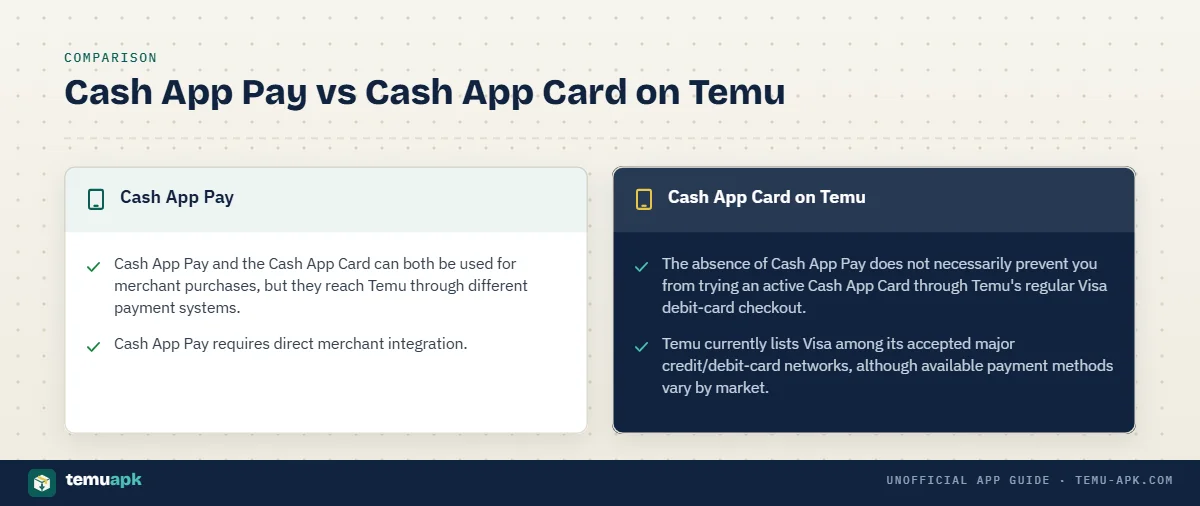
Cash App Pay and the Cash App Card can both be used for merchant purchases, but they reach Temu through different payment systems.
| Feature | Cash App Pay | Cash App Card |
|---|---|---|
| Where it appears | Separate Cash App payment option at supported checkout | Normal credit/debit-card form |
| Country availability | Cash App currently limits Cash App Pay availability by market | Depends on Cash App Card availability and merchant/card acceptance |
| Card number required | No card number entered into Temu | Yes, when entered manually as a Visa debit card |
| Uses Cash App balance | Yes, under Cash App’s funding rules | Yes, through the card-linked Cash App funds |
| Redirect/QR authorization | Yes; mobile can redirect to Cash App and desktop can use a QR flow | No separate Cash App Pay authorization flow |
| Works through card checkout | No; requires direct merchant support for Cash App Pay | Yes, where the Visa debit card is accepted |
| Refund destination | Handled through the Cash App Pay funding/refund route | Generally returned through the original card-payment route |
| Main reason it may be unavailable | Temu checkout or market does not support Cash App Pay | Card decline, insufficient funds, account restriction, or merchant/payment-processor decision |
Cash App Pay requires direct merchant integration. Cash App’s Terms of Service state that only approved merchants can accept Cash App Pay, and the payment is initiated through the merchant’s supported checkout, mobile redirect, or QR flow. (cash.app)
The Cash App Card behaves more like a conventional debit card. Cash App identifies it as a Visa debit card that can be used at merchants accepting Visa, subject to the available balance, transaction limits, and other restrictions. (cash.app) (cash.app)
This difference matters when Temu does not show a separate Cash App button. The absence of Cash App Pay does not necessarily prevent you from trying an active Cash App Card through Temu’s regular Visa debit-card checkout.
Temu currently lists Visa among its accepted major credit/debit-card networks, although available payment methods vary by market. (temu.com)
Can You Use a Cash App Card on the Temu App and Website?
Yes, a Cash App Card can be entered through Temu’s normal card-payment flow on the app or website where the card network is supported and the transaction is approved.
The basic payment logic is the same on both platforms:
- Add your products to the cart.
- Continue to checkout.
- Choose the credit/debit-card option.
- Enter the Cash App Card details.
- Check the billing information and final order amount.
- Submit the payment.
- Confirm that Temu actually created the order.
Temu processes this as a card transaction, not as a peer-to-peer Cash App transfer. You do not need to send money manually to a $Cashtag, email address, phone number, or individual.
Cash App states that its card can be used for online purchases wherever the participating Visa network is accepted, subject to account balance, transaction limits, merchant acceptance, and security restrictions. (cash.app) (cash.app)
The checkout may look different between the Temu app and Temu.com. Payment buttons, wallet options, and regional methods can vary by device and country, but the Cash App Card itself is still being submitted as a debit card.
Before entering card details, verify:
- you are using the genuine Temu app or Temu website;
- the final order amount is correct;
- the delivery country and currency are correct;
- the Cash App Card is active and unlocked;
- enough funds are available;
- the payment form is Temu’s normal checkout rather than an external person-to-person payment request.
For users who do not see Cash App Pay at checkout, the Cash App Card is generally the more straightforward alternative to check.
How Do Refunds Work If You Paid Temu With Cash App?
Refund handling depends on how you paid. A purchase made through Cash App Pay follows a different payment route from one made by entering a Cash App Card as a Visa debit card.
In either case, start the refund through Temu’s order and refund process, not by sending a request to a Cash App username or $Cashtag.
Temu currently allows eligible refunds to be issued either to Temu Credit or to the original payment method, depending on the refund flow and options presented for the order.
For Cash App Pay, Cash App says:
- the customer requests the refund from the merchant;
- the merchant initiates the refund;
- it can take up to 10 business days for Cash App to receive it;
- once Cash App receives the refund, the funds automatically appear in the applicable Cash App balance or linked payment source.
Cash App’s developer documentation further explains that a Cash App Pay transaction funded from the stored balance is refunded to the Cash App balance, while a payment funded through a linked debit card or bank account is returned to that original source.
If you paid using a Cash App Card through Temu’s normal Visa card form, the payment is treated as a card transaction. When Temu issues the refund to the original payment method, it should follow that original card-payment route.
Do not confuse a Temu Credit refund with money being returned to Cash App. Temu Credit stays inside the Temu account and can be used for future Temu purchases; Temu says it cannot normally be withdrawn as cash.
Do You Need to Keep Your Cash App Card Saved on Temu for a Refund?
No. Keeping a Cash App Card saved in your Temu payment-method list and receiving a refund are separate issues.
A saved-card entry is mainly there to make future checkout easier. A refund to the original payment method is linked to the payment used for the completed transaction, not to whether you still keep that card saved for future Temu orders.
Removing the card from your Temu account therefore does not, by itself, cancel a refund that has already been initiated to the original payment method.
If your Cash App Card has since been:
- replaced;
- expired;
- closed;
- otherwise made inaccessible;
and a refund does not arrive as expected, check the refund status in Temu first and then contact the relevant payment provider for help tracing how the returned funds are handled.
Is It Safe to Use Cash App on Temu?
Using Cash App through Temu should stay inside the genuine Temu checkout flow.
If Temu displays Cash App Pay, select it from checkout and follow the authorization process provided by Cash App. Cash App describes Cash App Pay as a merchant-payment system used by approved merchants, not as a reason to send a person a separate peer-to-peer transfer.
If you use a Cash App Card, enter its details only in Temu’s normal credit/debit-card payment form.
Do not send a Temu payment directly to:
- a
$Cashtag; - a person’s phone number;
- an email address;
- a Cash App account supplied in a private message.
A legitimate Temu purchase should result from Temu’s merchant checkout, not from an unrelated person-to-person transfer.
Never share:
- your Cash App PIN;
- Cash App sign-in or verification codes;
- your Temu password;
- one-time authentication codes;
- your card security code outside a genuine payment form.
Temu’s Support Center currently includes a dedicated topic called “How to identify a Cash App scam account,” alongside its other payment-security guidance.
Be especially cautious if a message claims that:
- Temu checkout has failed and you must pay separately through Cash App;
- you need to send money to unlock an order or refund;
- you must provide a verification code to receive a refund;
- the seller needs your Cash App login information.
Those are different from selecting Cash App through Temu’s normal checkout.
What Can You Use If Cash App Is Not Available on Temu?
If Cash App does not appear at your Temu checkout, use one of the payment methods Temu actually offers for your account and region.
Temu currently lists commonly supported options including:
- Visa and other major credit/debit cards
- PayPal
- Apple Pay
- Google Pay
- Temu Credit
Its support documentation lists Visa, Mastercard, Discover, American Express, JCB, Diners Club, Maestro, Cartes Bancaires, Temu Credit, PayPal, Apple Pay, and Google Pay among supported methods on the relevant regional page.
Some Temu markets also show additional services such as:
- Afterpay;
- Klarna;
- Affirm;
- Venmo;
- Zip;
- other regional or pay-later methods.
Payment availability is not identical everywhere. The options shown on the actual checkout for your order are more useful than an old screenshot or a payment-method list from another country.
If Cash App Pay is missing but Temu accepts Visa cards, an active Cash App Card may still be worth trying through the ordinary debit-card form, subject to normal transaction approval.
Do not install an unrelated payment app, unknown APK, or third-party checkout tool simply to complete a Temu purchase. Use one of the payment methods Temu presents directly for your current account, currency, and delivery region.
Conclusion
You can use Cash App with Temu when the payment route is supported for your checkout. If Cash App Pay appears, you can authorize the purchase through Cash App. If it does not, an active Cash App Card may still work through Temu’s normal Visa debit-card checkout.
The important distinction is that Cash App Pay, the Cash App Card, Cash App balance, and Temu Credit are separate payment methods or funding sources. Temu’s available payment options also vary by market, so the checkout screen for your actual order is the best availability check.
If a payment fails, check Cash App and any pending Temu authorization before retrying. For refunds, use Temu’s normal refund process rather than sending or requesting money through a separate $Cashtag.
FAQ
Can I use Cash App on Temu without a Cash App Card?
Yes, when Cash App Pay appears as a payment option. Cash App says Cash App Pay lets customers complete merchant purchases using their Cash App account without entering a card number. On mobile it can redirect to Cash App; desktop checkouts can use a QR code.
Can I use my Cash App Card if Temu does not show a Cash App button?
Potentially, yes. A Cash App Card is a Visa debit card, while Temu accepts Visa among its supported card networks. You can try entering the card through Temu’s normal debit-card checkout, although each transaction remains subject to balance, security, regional, and payment-processor checks.
Can Cash App Pay split a Temu purchase between my balance and debit card?
Cash App says no. It first attempts to cover the full transaction from your stored balance. If the balance is insufficient, 100% of the transaction is charged to the linked debit card rather than splitting the payment between the two sources.
Why does Cash App show a Temu payment when Temu shows no completed order?
The Cash App entry may be a temporary authorization rather than a completed purchase. Check Temu for an order confirmation and review the transaction status in Cash App before submitting the payment again. Multiple retries can make temporary authorizations harder to distinguish from completed charges.
Should I ever send a Temu payment directly to a $Cashtag?
No. Cash App Pay is designed to start through an approved merchant’s checkout, including a mobile redirect or checkout QR code. A request to leave Temu and send money manually to an individual $Cashtag is not the normal Temu merchant-payment flow.
One Comment